
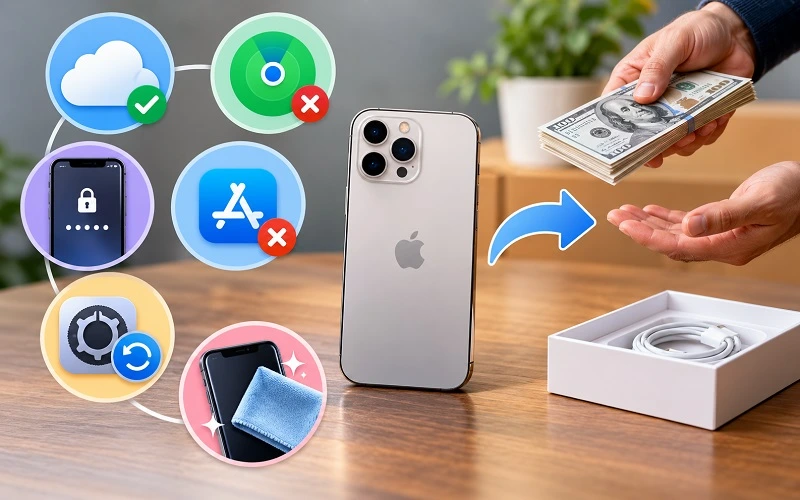
Selling an old iPhone is usually straightforward, but it is worth spending a few minutes preparing the device before you hand it over. Your phone may still contain years of photos, messages, saved passwords, payment information, emails, contacts, and access to personal accounts. It may also still be connected to your Apple Account through Find My iPhone.
Preparing everything in the right order protects your information and makes the phone easier to evaluate when you are ready to sell it.
If you are planning to sell your iPhone in Orlando, this guide walks you through what to back up, what to remove, what to check, and what you should bring with you.
Quick Answer: What Should I Do Before Selling My iPhone?
Before selling your iPhone, back up anything you want to keep, make sure your information has transferred to your new device, sign out of your Apple Account, turn off Find My iPhone, and erase the phone using Erase All Content and Settings. You should also check your SIM or eSIM, confirm the model and storage capacity, and take a quick look at the phone’s physical condition. If your phone is ready and you want to see what it may be worth, you can sell your iPhone in Orlando through an in-person evaluation.
Start by Backing Up Anything You Want to Keep
Your backup should always come before the factory reset.
Most people have more stored on their phones than they realize. Photos and contacts are obvious, but your iPhone may also contain notes, saved files, messages, account information, authentication apps, and app data that could be difficult to recover once the device has been erased.
If you use iCloud, you can check your backup from Settings > [Your Name] > iCloud > iCloud Backup and select Back Up Now. Keep the phone connected to Wi-Fi while the backup finishes.
If you already have your replacement iPhone, you may prefer to transfer your data directly to it. Whichever method you use, spend a few minutes checking the new phone afterward. Open your photos, contacts, messages, notes, and any important apps so you know the information you need has actually moved across before deleting anything from the old device.
Make Sure Important Apps Have Transferred Properly
A normal iPhone backup covers a lot, but some apps need extra attention. Banking apps, authenticator apps, password managers, messaging services, and work accounts may ask you to sign in again or complete a separate transfer process.
It is much easier to deal with those steps while you still have access to your old phone.
If you use an authentication app for two-factor authentication, for example, make sure your codes or accounts are available on your replacement device before wiping the old one. The same applies to any app containing information that is not automatically stored in iCloud.
Unpair Your Apple Watch Before Erasing the Phone
If an Apple Watch is paired with the iPhone you are selling, unpair it before resetting the phone. You can do this through the Watch app on your iPhone.
This separates the watch from your old phone properly and makes it easier to connect the watch to your replacement iPhone later. It also avoids the frustration of discovering after the reset that the watch is still tied to a device you no longer use.
Check That You Know Your Apple Account Password
This is an easy step to overlook.
Before you start signing out of accounts, make sure you know the password for the Apple Account connected to the phone. You may need it to disable Find My iPhone or complete the sign-out process.
If you have forgotten the password, it is better to recover access while the phone is still with you rather than waiting until you are standing in front of a buyer trying to complete the sale.
Sign Out of Your Apple Account
Once your important information has been safely transferred, you can begin removing your personal accounts from the old device.
Open Settings, tap your name at the top of the screen, scroll down, and choose Sign Out. Your iPhone may ask for your Apple Account password as part of this process.
Signing out helps separate the device from services connected to your account, including iCloud. This is an important part of preparing an iPhone for a new owner.
Do not give your Apple Account password to someone buying the phone. Any account removal should be completed by you while the device is still in your possession.
Turn Off Find My iPhone and Remove Activation Lock
Find My iPhone is useful while you own the device because it helps protect it if it is lost or stolen. The same protection can become a problem, however, if the phone is sold while it remains linked to your Apple Account.
Activation Lock can prevent another person from setting up the phone even after the device has been erased.
You can check the setting by going to Settings > [Your Name] > Find My > Find My iPhone.
Make sure the device is no longer connected to your account before completing the sale. If you are visiting a local buyer in Orlando and are unsure whether the phone has been removed correctly, keep access to your Apple Account available until the evaluation is finished.
Check Apple Wallet and Other Personal Accounts
Your iPhone may also have cards, passes, transit information, or other personal items saved in Apple Wallet. These should be reviewed as part of the same preparation process.
It is also worth thinking about apps that contain particularly sensitive information, such as banking apps, email accounts, cloud storage, password managers, and work applications.
You do not need to spend hours manually deleting every app or account. The proper factory reset will remove the data stored on the phone. The purpose of checking beforehand is simply to make sure there is nothing you still need to transfer or disconnect.
Switching to Android? Check iMessage Before You Sell
If you are moving from one iPhone to another, you usually do not need to worry much about iMessage because your Apple services will continue on the new device.
If you are switching from an iPhone to an Android phone, however, it is worth making sure your phone number is no longer tied to iMessage in a way that could interfere with text messages.
Doing this before you lose access to the old iPhone can save you from wondering later why some messages are not arriving on your new phone.
Factory Reset the iPhone Only After Everything Else Is Ready
Once your backup is complete, your important apps are transferred, and the Apple Account has been dealt with, you can erase the device.
Go to Settings > General > Transfer or Reset iPhone > Erase All Content and Settings and follow the instructions shown on the screen.
The reset removes the personal content stored on the iPhone and returns it to the initial setup screen. When it is finished, you should not see your photos, messages, apps, email accounts, or home screen anymore.
There is usually no reason to manually delete photos and apps one at a time before doing this. In fact, manually deleting synced information can sometimes create unnecessary problems if those changes are also reflected in iCloud. Backing up first and then using Apple’s normal erase process is the cleaner approach.
What Should You Do With the SIM or eSIM?
What happens to your phone service depends on the iPhone you use.
If your device has a physical SIM card and you are keeping the same phone number, remove the SIM before handing the phone over. You can then insert it into a compatible replacement phone or follow your carrier’s instructions.
Newer iPhones may use eSIM instead. In that situation, make sure your phone number has transferred successfully to your new device before you erase or sell the old one. Your carrier can help if the transfer does not complete properly.
The main thing is to confirm that calls and texts are working on your replacement phone before you give up access to the old one.
Find Out Which iPhone Model and Storage Size You Have
Two iPhones can look nearly identical while having very different resale values, so it helps to know exactly which model you are selling.
Before resetting the phone, open Settings > General > About. Here you can check details such as the model name and storage capacity.
Storage matters because a 128GB version of an iPhone may be valued differently from the same model with 256GB or 512GB. The specific generation also matters, even when two phones have a similar design.
You do not need to post your IMEI or serial number publicly. Those identifiers can be checked privately during an evaluation when necessary.
If you are unsure exactly which model you own, SellPhoneOrlando can identify the device during an iPhone evaluation in Orlando.
Take an Honest Look at the Phone’s Condition
You do not need to inspect your iPhone like a technician, but it helps to know its general condition before asking what it may be worth.
Look at the display for cracks or deep scratches, check the back glass and camera lenses, and notice any visible dents around the frame. You should also think about whether the cameras work properly, whether Face ID still works, how well the phone charges, and whether you have noticed any unusual battery problems.
Damage does not automatically mean the phone cannot be sold.
An iPhone with a cracked screen, worn battery, broken back glass, or cosmetic wear may still have value depending on the exact model and how well the rest of the device works. If you are unsure, getting the phone evaluated in its current condition is often more useful than trying to estimate its value from appearance alone.
Should You Repair a Damaged iPhone Before Selling It?
This depends on the problem and the value of the phone.
Suppose your iPhone has a cracked screen. Replacing the screen may improve the condition of the device, but that does not necessarily mean the increase in resale value will be greater than the cost of the repair. The same applies to worn batteries, damaged back glass, camera problems, and charging issues.
For that reason, it can make more sense to have the phone evaluated before spending money on repairs. Once you know how the device is valued in its current condition, you can make a more informed decision about whether fixing it first is worthwhile.
If you decide that you would rather keep the phone and fix the problem, you can also explore phone repair in Orlando.
Give the Phone a Simple Clean Before the Evaluation
A quick clean can make the phone easier to inspect, but there is no need to make an older iPhone look brand new.
Remove the case and gently wipe fingerprints, dust, and surface dirt away with a soft microfiber cloth. If there is debris around the edges of the case or camera area, clean it carefully without forcing anything into the charging port, speakers, or other openings.
Avoid pouring cleaning liquid directly onto the phone.
More importantly, do not worry about trying to hide scratches, dents, or cracks. A normal evaluation will take the real condition of the device into account anyway. The goal is simply to bring in a phone that is clean enough to inspect properly.
Do You Need the Original Box or Charger?
Many people keep an old iPhone in a drawer for years and have no idea where the original box went. That alone should not stop you from getting the phone evaluated.
If you still have the original box, cable, or accessories, you can bring them with you, but the iPhone itself is what matters most when determining the device’s condition and value.
Do not assume that losing the packaging makes the phone worthless.
Bring Identification When Selling Your iPhone Locally
If you are selling an iPhone in person, bring valid government-issued photo identification with you.
You should also make sure you can access the Apple Account connected to the phone in case an account lock or Find My setting needs to be resolved before the transaction can be completed.
Having everything ready before you arrive makes the process much easier than discovering afterward that you need to go home for an ID or recover an account password.
What Actually Affects the Value of a Used iPhone?
There is no single price that applies to every used iPhone. Even two devices from the same generation can receive different evaluations.
The exact model and storage capacity are important, but condition also makes a difference. Screen damage, back-glass damage, battery condition, camera problems, Face ID issues, charging problems, carrier status, and whether the phone is locked to an account can all affect the evaluation.
Market demand changes as well. When newer iPhones are released, the resale market for older models can change over time.
That is why an actual inspection is usually more useful than relying on a generic price found online.
Should You Erase Your iPhone Before Getting an Offer?
You should definitely erase your personal information before permanently handing the phone over to someone else, but you do not have to rush through the process before you have confirmed your backup.
If you still use the phone and only want to find out whether selling it makes sense, make sure you know your Apple Account details and have a current backup available.
Before ownership actually changes, however, the phone should be removed from your account and properly erased.
Complete iPhone Selling Checklist
Before you leave to sell your iPhone, make sure you have covered the essentials:
- Your important photos, contacts, messages, and files are backed up.
- Your information has transferred successfully to your new device.
- Your Apple Watch has been unpaired if necessary.
- You know your Apple Account password.
- Find My iPhone and Activation Lock have been removed.
- Your personal data has been erased before the final handover.
- Your SIM or eSIM has been transferred correctly.
- You know the iPhone model and storage capacity.
- You have your government-issued photo ID with you.
You do not need to make the phone perfect before bringing it in. The most important things are protecting your information and making sure the device is no longer tied to an account that could prevent a new owner from using it.
Ready to Sell Your iPhone in Orlando?
Once your data is backed up and the device is prepared, you can bring your iPhone to SellPhoneOrlando for an in-person evaluation.
Whether your iPhone is in excellent condition, has everyday wear, or has damage such as a cracked screen or worn battery, its value can be assessed based on the actual device rather than a generic online estimate.
Frequently Asked Questions
What is the most important thing to do before selling an iPhone?
Back up your personal information before erasing anything. Once you know your photos, contacts, messages, and other important data are safe, you can remove your Apple Account and prepare the device for its next owner.
Should I factory reset my iPhone before selling it?
Yes. Before permanently handing over the phone, remove your Apple Account and use Erase All Content and Settings to remove your personal information. Make sure your backup and data transfer are complete first.
Should Find My iPhone be turned off before selling?
Yes. Find My is connected to Apple’s Activation Lock protection. An iPhone that remains tied to the previous owner’s Apple Account may not be usable by the next owner.
Can I sell an iPhone with a cracked screen?
A cracked screen does not automatically mean an iPhone has no value. Its model, storage, functionality, overall condition, and current resale demand can all influence what it may be worth.
Should I replace the battery before selling my iPhone?
Not necessarily. Battery condition can affect an iPhone’s value, but replacing it costs money as well. It may be better to get an evaluation first and then decide whether a battery replacement makes financial sense.
Can I sell an iPhone without the original box?
Yes, an original box is not necessarily required for an iPhone evaluation. The device itself, its specifications, condition, and functionality are generally much more important.
Do I need my Apple Account password when selling an iPhone?
It is a good idea to have access to your Apple Account before selling the phone. You may need the password to sign out, disable Find My, or remove Activation Lock.
Can I sell an older iPhone in Orlando?
Older iPhones may still have resale value depending on the model, storage capacity, condition, functionality, and current demand. Instead of assuming the phone is too old, you can get your iPhone evaluated in Orlando.
Where can I sell my used iPhone in Orlando?
SellPhoneOrlando provides in-person iPhone evaluations in Orlando. You can bring in your device, have its model and condition checked, and review the offer before deciding whether you want to sell it.
Can I sell a damaged iPhone?
Potentially. Damage such as cracked glass, cosmetic wear, battery problems, or other faults can affect the value, but it does not automatically make the phone unsellable. The best way to know is to have the actual device evaluated.